Is DripWriter Down? What to Check When It Won't Load
 By Aarohan Niraula7 min read
Is DripWriter down, or is it your network? The checks from DripWriter's own FAQ: phone hotspot, private window, ISP filters, sign-in blocks, and who to email.
Is DripWriter down? Usually not. DripWriter's own FAQ says that most of the time the service is running normally and "something on your device or network is getting in the way". The fastest check is to open dripwriter.com on your phone with Wi-Fi turned off. If it loads there, the site is up, and the problem is on your network or in your browser.
We make TrickleType, another auto typer for Google Docs, so weigh the last part of this page accordingly. We don't run DripWriter and can't see its servers, so this page can't tell you its status at this minute. What it can do is walk you through the checks DripWriter itself publishes in its public FAQ, checked 2026-11-16. If those don't fix it, DripWriter's support address is team@dripwriter.com.
Is DripWriter down, or is it your network?
Start here, because it splits the problem in two. DripWriter's FAQ has an entry titled "Is Dripwriter down? Why can't I load the site?", and its first line is the check that matters: "If Dripwriter loads on your phone or a hotspot but not on home WiFi, the site is up".
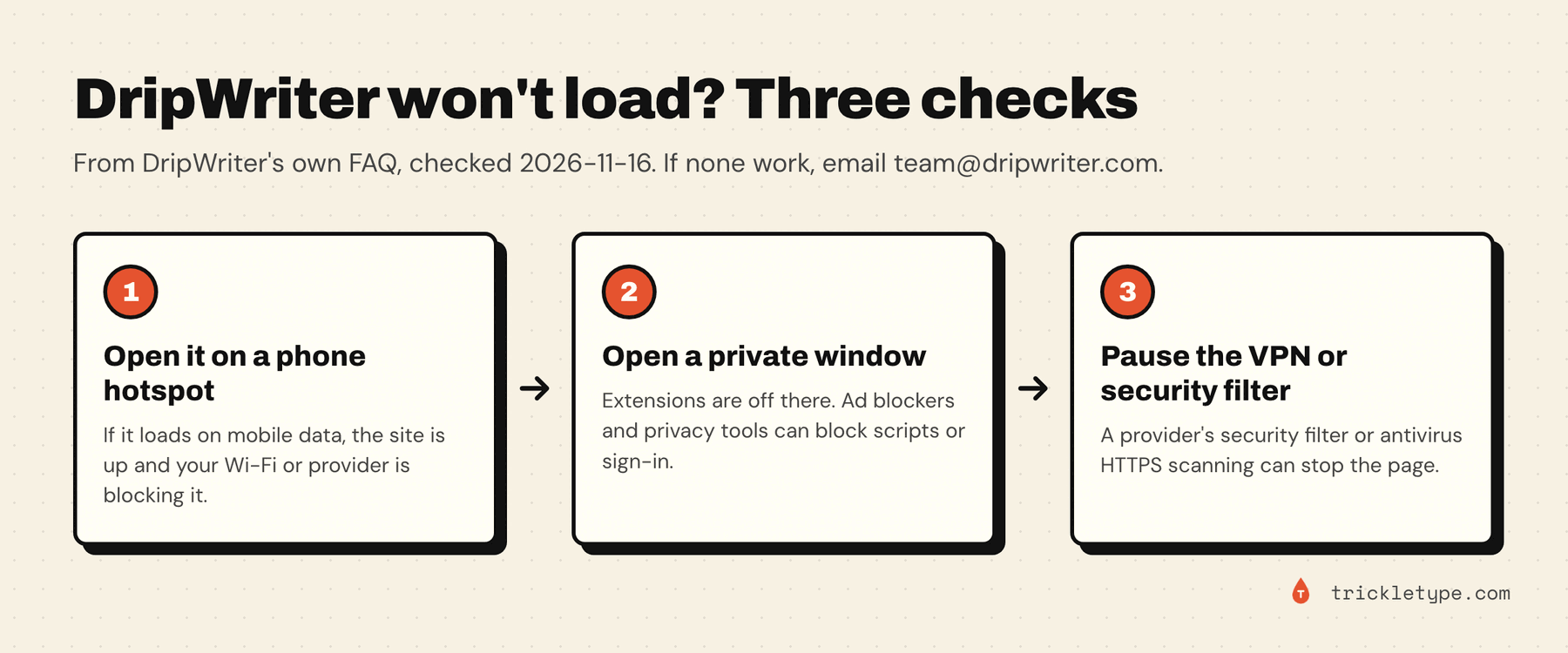
So:
- Turn off Wi-Fi on your phone and open dripwriter.com on mobile data. Or connect your laptop to your phone's hotspot.
- It loads: DripWriter is up. Something between your Wi-Fi and the site is stopping it. Keep reading this section.
- It doesn't load anywhere: skip to when to email DripWriter.
When the site works on mobile data but not on your Wi-Fi, the FAQ points at your internet provider or your router's security filter. It lists the screens people see: ERR_SSL_PROTOCOL_ERROR ("can't provide a secure connection"), ERR_CONNECTION_CLOSED, or a block page from the provider's security tool. The FAQ's explanation is that such a tool often "flags new or low-traffic sites, or breaks the secure handshake".
What the FAQ suggests, in order:
- Stay on the hotspot if you only need to get one thing done now.
- Spectrum customers: in the My Spectrum app, go to Internet, pick your router, and turn off Security Shield. Or ask the account holder to have Spectrum verify dripwriter.com through its support pages.
- Work or other managed networks: these "frequently block third-party sites". Use a hotspot or your own Wi-Fi.
- VPN or antivirus: turn off the VPN, or the antivirus feature that scans HTTPS traffic, for a minute and try again.
DripWriter won't open or sign in
If you're asking "is DripWriter down" because the page stalls or the sign-in fails, the FAQ's entry "Why can't I open or access Dripwriter?" says to start with a private window, "so extensions are off and cache is clean". In Chrome that's Ctrl+Shift+N on Windows and Linux, or Cmd+Shift+N on a Mac. Google's help page on browsing in Incognito mode has the steps for every device.
The FAQ's reason: "ad blockers, privacy tools, and other extensions often block scripts or sign-in even on home WiFi."
If the private window works, one of your extensions is the cause. Turn them off one at a time until DripWriter loads.
If the private window doesn't help, the FAQ's next steps are:
- Hard refresh: Ctrl+Shift+R, or Cmd+Shift+R on a Mac.
- Another browser.
- A different Google account. DripWriter signs you in with Google. On an account that an organisation manages, the FAQ says "your admin may restrict apps that use Google". That setting belongs to the organisation: Google's admin help explains how admins control which third-party apps can access Google data. A personal Google account on your own device and network avoids it.
The same cause sits behind one specific error. If DripWriter says it can't access an existing Google Doc, the FAQ says this usually happens when an organisation blocks third-party apps from connecting to Google, or when "you're not an editor on the doc". Its fix: create a new Doc from DripWriter, or use a personal Google account and a Doc you own.
The page loads, but it looks broken
A page with no styling, where the buttons do nothing, is a different problem. DripWriter's FAQ calls it "a temporary loading issue caused by a slow or interrupted connection". Its steps:
- Hard refresh (Ctrl+Shift+R, or Cmd+Shift+R).
- Try a private window.
- Clear your browser cache.
- Try a different browser.
- Switch networks, or use your phone's hotspot.
DripWriter is up, but the run didn't go as expected
Sometimes the question isn't "is DripWriter down" at all. The site works, a run started, and the result surprised you. The FAQ covers the common cases, and none of them is an outage:
| What you saw | What DripWriter's FAQ says |
|---|---|
| The text appeared all at once at the end | "there are too many words for the duration you chose, so the tail bunches up at the end." Shorten the text or pick a longer time. |
| Part of the text is missing | At the word limit, DripWriter "keeps your text up to the cap for the duration you picked and drops anything past that." The editor shows a "Word limit reached" note. |
| The countdown hit zero and it's still going | "Usually no", it isn't stuck. The ETA is an estimate. If nothing changes for several minutes, pause and resume, or email support with your session ID. |
| It ran longer than the time you picked | The time is "a target, not a hard cutoff"; runs land "usually around 10–15% longer". |
| It stopped when you closed the tab (Free plan) | The FAQ says a Free run "continues only while the Dripwriter tab stays open" and pauses when the device sleeps. The pricing page says background runs work on all plans, so ask DripWriter which applies to you. |
| "Use existing Google Doc" is greyed out (Free plan) | On Free that option is "a limited trial period of 3 days". |
| An image didn't arrive | Images copied from the web won't work. Add them with the image button in DripWriter's editor, then start again. |
The word limit catches people most often. DripWriter's free plan is 250 words a day, per its pricing page, and every run also has a cap that depends on its length. Our DripWriter vs TrickleType page has the details under "What is DripWriter's word limit?".
When to email DripWriter
If the site doesn't load on any network, or you've gone through the checks above, write to team@dripwriter.com. The FAQ asks you to say what you tried. For a run that looks frozen, include the session ID. It's the one channel the FAQ names, for "anything from billing questions to technical issues".
We found no status page linked from DripWriter's FAQ or pricing page on 2026-11-16, so if you still wonder "is DripWriter down" after the hotspot check, an email is how you'd confirm it.
If a failed payment is behind the trouble, billing lives under Manage Plan on your account page, and our guide on how to cancel a DripWriter subscription covers that screen.
A DripWriter alternative that types in your own browser tab
If DripWriter works again, you're done. If you keep hitting the same wall, especially the Google sign-in on a managed account, have you considered TrickleType? It's the Chrome extension we make. It types a draft you already have into the Google Doc you pick, key by key, over the time you set.
It's built differently:
- No Google sign-in for typing in a tab. You install the extension, open your Doc, paste the draft and press start. There's no app to connect to your Google account. Only Pro's cloud typing asks you to sign in with Google.
- No website has to load during a run. The typing happens inside your own Chrome tab, in the Doc you already have open.
- It only touches the Doc you pick.
It has limits of its own. It needs Chrome on a computer. When it types in a tab, Chrome has to stay open and the computer awake; a background tab is fine. And if an organisation manages your Chrome profile, it may block installing extensions, the same way it can block apps.
The prices, monthly plan against monthly plan, in USD, DripWriter's as listed on its pricing page and FAQ and checked 2026-11-16:
| DripWriter | TrickleType | |
|---|---|---|
| Pro, monthly | $15 | $6.99 |
| Pro, yearly | $108 | $39.99 |
| Free plan, words a day | 250 | 1,000 |
| Free plan, longest run | 60 minutes | 3 hours |
| Sign-in to type | Google sign-in | None in a tab; Google for cloud typing |
TrickleType Pro adds runs of up to 10 days, a heavier typo setting (a few typos are free), and cloud typing that keeps going with the laptop closed. Cloud typing is in beta, with up to 3 runs at once and 100,000 words a month. If something goes wrong on our side, the support page says how to reach us.
Where DripWriter is better
A loading problem you can fix in five minutes isn't a reason to switch. DripWriter does things TrickleType doesn't:
- Formatting. DripWriter carries bold, headings, lists, tables and images into the Doc. TrickleType types plain text, so you format afterwards.
- Every paid run continues with the laptop shut. DripWriter's features page says a session "runs server-side". On TrickleType that's Pro's cloud typing only, and it's in beta.
- Nothing to install. DripWriter is a web app you sign in to. TrickleType is an extension, and it needs Chrome.
- A one-day option. The $8 Day Pass covers 24 hours with no subscription. TrickleType has no day pass.
If you rely on one of those, fix the connection and stay where you are.
Frequently asked questions
Is DripWriter down right now?
We make TrickleType, not DripWriter, so we can't see its live status. DripWriter's FAQ says that most of the time it is running normally and something on your device or network is in the way. Open dripwriter.com on mobile data or a phone hotspot: if it loads there, the site is up (checked 2026-11-16).
Why does DripWriter load on my phone but not on my Wi-Fi?
DripWriter's FAQ says that means the site is up and your internet provider or router security filter is blocking it. It suggests a phone hotspot, turning off the provider's security filter (it names Spectrum Security Shield), a private window, and pausing a VPN or antivirus HTTPS scanning.
Why can't I sign in to DripWriter?
DripWriter signs you in with Google. Its FAQ says ad blockers and privacy extensions can block the sign-in, so try a private window first. On a Google account managed by an organisation, the admin may restrict which apps can connect; a personal Google account on your own device and network avoids that.
Why did my DripWriter text appear all at once?
According to DripWriter's FAQ, this typically happens when there are too many words for the duration you chose, so the end bunches up. Shorten the text or pick a longer time.
How do I contact DripWriter support?
Email team@dripwriter.com. DripWriter's FAQ asks you to say what you already tried, and to include the session ID if a run looks frozen.
Is there a DripWriter alternative that doesn't need a Google sign-in?
TrickleType, which we make, types inside your own Chrome tab with no Google sign-in; only its Pro cloud typing asks for one. Free is 1,000 words a day against DripWriter's 250, and Pro is $6.99 a month against $15 (USD, checked 2026-11-16). DripWriter keeps formatting and needs no install; TrickleType types plain text and needs Chrome.
Related guides
- DripWriter vs TrickleType: free plans, prices and limits
- DripWriter alternatives compared
- How to cancel a DripWriter subscription
- TrickleType: a free DripWriter alternative for Google Docs
- TrickleType Pro plans and prices
DripWriter is a trademark of its owner. TrickleType is not affiliated with, endorsed by or connected to Dripwriter LLC.