DripWriter Alternatives Compared: 4 Auto Typers for Docs
 By Aarohan Niraula7 min read
DripWriter alternatives compared on free words, run length, price and sign-in: TrickleType, Write It, Dripwriter Origin and WriterDrip, with dated facts.
DripWriter is a web app at dripwriter.com that types a draft you paste into a Google Doc, bit by bit, over a time you pick. So the DripWriter alternatives worth comparing are other auto typers for Google Docs: TrickleType, Write It, Dripwriter Origin and WriterDrip. All four type a draft you already have into a Doc at a set pace, and all four have a free way in. They differ in how many words you get for free, how long a run can last, whether typing continues with the laptop closed, whether you sign in, and what the paid plan costs.
We make TrickleType, so it's first on this list; weigh that accordingly. Every fact about the other tools comes from their own public pages, linked below and checked 2026-11-20. Each entry also says where that tool is the better pick, because it sometimes is.
What DripWriter does, so you compare like with like
DripWriter's homepage sums it up as "Paste your text. Pick a duration." The text then goes into a Google Doc on that schedule. Its free plan is 250 words a day with runs of up to an hour, and Pro is $15 a month or $108 a year, per its pricing page and FAQ (USD, checked 2026-11-20).
So a DripWriter alternative is another tool that types prepared text into a document at a pace you set. Two mix-ups are common:
- Email tools. Drip is an email marketing platform, and "drip" emails are a marketing term. DripWriter has nothing to do with either, so Mailchimp and similar tools are not alternatives to it.
- AI writers. Lists of DripWriter alternatives sometimes name Jasper, Writesonic or Rytr. Those generate new text. They don't type your existing text into a Doc, so they solve a different problem.
The DripWriter alternatives at a glance
Free plans compared with free plans, paid monthly plans with paid monthly plans, in USD, checked 2026-11-20:
| TrickleType | Write It | Dripwriter Origin | WriterDrip | DripWriter | |
|---|---|---|---|---|---|
| Free words a day | 1,000 in a tab | 350 with Cloud Typer | No limit published | No limit published | 250 |
| Longest free run | 3 hours | 5 hours (Cloud Typer) | Types at a set speed | 1 week | 1 hour |
| Paid monthly plan | $6.99 | $10 (Plus) | None, it's free | None, it's free | $15 |
| Pay-once option | Lifetime plan | None | Not needed (free) | Not needed (free) | $8 Day Pass (24 hours) |
| Keeps typing with the laptop closed | Pro (cloud typing, beta) | Yes (Cloud Typer) | No | No | Yes |
| Where it types | Google Docs | Docs, Slides, Word online | Almost any text box | Google Docs | Google Docs |
| Browsers | Chrome | Chrome | Chrome, Edge, Firefox | Chrome | Any (web app) |
1. TrickleType: the most free words and the lowest paid price
TrickleType is a Chrome extension that types your draft into the Google Doc you have open, at a natural pace, over the time you pick. You set when it should finish (an hour, an afternoon, three days) instead of a words-per-minute number, and it works out the pace.
- Free: 1,000 words a day, runs up to 3 hours, typing in your own Chrome tab with no Google sign-in.
- Pro: $6.99 a month or $39.99 a year. It's the only tool on this list with a pay-once Lifetime plan, so you can pay once and keep Pro instead of subscribing. No word limit in a tab, runs up to 10 days, a heavier typo setting (a few typos are free), and cloud typing in beta that keeps going with the laptop closed (up to 3 runs at once, 100,000 words a month). See Pro plans.
- Access: the extension only runs on docs.google.com, and only in the Doc you start it in.
Pick it if you want the most published free words of any tool here, or the cheapest paid plan, or a finish time instead of a typing speed.
Look elsewhere if you need Slides or Word (Write It), a browser other than Chrome (Dripwriter Origin), or free typing with the laptop closed every day (Write It's Cloud Typer).
2. Write It: a broader toolkit with free cloud typing
Write It is a Chrome extension and web app that bundles an auto typer with AI writing tools: a chat assistant called Apollo, research and citation tools, and grammar checks. The Chrome Web Store lists it at 20,000 users (checked 2026-11-20).
- Typing: an in-browser auto typer for "Docs, Slides, and Word Online" that is "free with a Write It account", plus Cloud Typer (beta), which keeps typing after you close the tab.
- Free cloud typing: "350 words a day typed across up to 5 hours", per its comparison page.
- Paid: its pricing page lists "Plus at $10/mo and Premium at $15/mo". A longer billing cycle is also offered.
- Extras: placement pins that type into chosen spots in a Doc, including table cells, and typing hours, so Cloud Typer keeps to the hours you choose.
Pick it if you want typing in Slides or Word, free typing with the laptop closed, or AI writing tools in the same extension.
Look elsewhere if you only need the typing: TrickleType's free plan types more words a day in a tab, and its Pro plan costs less per month. More detail: Write It vs TrickleType.
3. Dripwriter Origin: free and open source
Dripwriter Origin is a free, open-source browser extension by Alexey Fedorov. Its site says it is not affiliated with Dripwriter, LLC. You paste text into its toolbar popup, set the cadence and press Start.
- Typing: "adjustable typing speed (20–150 WPM)", typos on neighbouring keys that get corrected, occasional false-start words, and short breaks at sentence ends, per its GitHub README.
- Where: Google Docs and "virtually any" text box, in Chrome, Edge and Firefox.
- Privacy: its site says "No accounts, no telemetry, no servers."
- Licence: noncommercial use is free; commercial use needs a separate licence.
Pick it if you want typos and long typing at no cost, a browser other than Chrome, or an editor other than Google Docs.
Look elsewhere if you want to set a finish time rather than a speed, or keep typing with the laptop closed. It has no servers, so typing happens in your open browser. More detail: Dripwriter Origin vs TrickleType.
4. WriterDrip: free, open source, loaded by hand
WriterDrip is a free Chrome extension for Google Docs under the MIT licence. Its README calls it "an independent open-source project" and lists version 1.0.3 (checked 2026-11-20).
- Install: you download the code from GitHub, turn on Developer mode at
chrome://extensionsand click "Load unpacked". Updates are manual: you download the newer code and reload it. - Typing: you choose a duration, "from the draft-sized minimum up to 1 week", with pause, resume and stop. It has four typo settings: Suggested, Low, Medium and High.
- Privacy: "No Google OAuth", "No server-side typing jobs" and "No text upload".
- Limits it states: it "cannot run if the browser is closed, the computer shuts down, or the lid forces sleep", and the Doc's tab has to stay open.
Pick it if you want long runs in Google Docs at no cost and you're comfortable loading an extension from source.
Look elsewhere if you want a one-click install with automatic updates from the Chrome Web Store, or typing that carries on with the laptop closed.
Which DripWriter alternatives work without a Google sign-in?
Three of the four need no account at all for typing in a tab. DripWriter itself "connects securely to your Google account", per its homepage, because its servers do the typing. The alternatives that type inside your own browser don't need that:
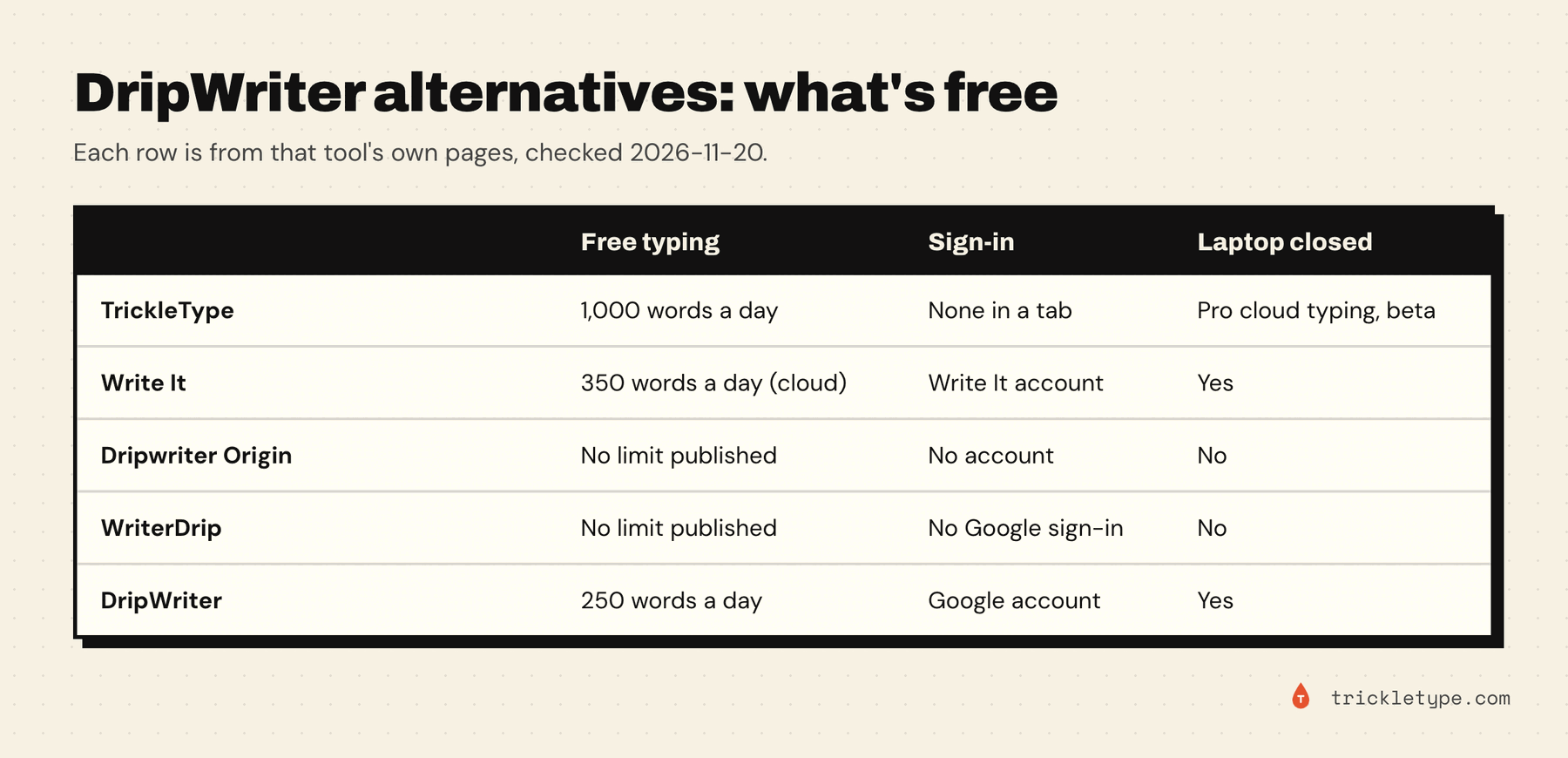
- TrickleType: no account and no Google sign-in for typing in a tab. Only cloud typing asks you to sign in with Google, so it can reach the Doc you pick.
- Dripwriter Origin: "No accounts. No signup."
- WriterDrip: "No Google OAuth".
- Write It: the in-browser typer needs a Write It account. Cloud Typer also connects to the Google Doc, since the typing happens on its servers.
The trade is the same everywhere: typing in your own tab needs no sign-in but needs the browser open, and typing from a server works with the laptop closed but needs access to the Doc.
Which DripWriter alternative should you choose?
- Most published free words in Google Docs, or the lowest paid price: TrickleType.
- Slides, Word, or free cloud typing: Write It.
- Free with typos, any browser, any text box: Dripwriter Origin.
- Free week-long runs in Google Docs, loaded from source: WriterDrip.
- A single day of heavy use with formatting kept: DripWriter's $8 Day Pass is still a good deal, and it keeps bold, headings and lists. TrickleType types plain text.
Where the DripWriter alternatives fall short
DripWriter applies the formatting you set in its editor, "headings, bold, lists, images, tables, headers, and footers", as it types, per its FAQ. Its pricing page also lists "Background drips (tab can be closed)", so a run carries on from its servers. TrickleType types plain text, and only its cloud typing runs with the laptop closed. If formatting matters most, try a short passage in each tool before you pay.
Frequently asked questions
What is the best free DripWriter alternative?
It depends on what you need for free. We make TrickleType, which gives 1,000 words a day in your Chrome tab with no sign-in. Dripwriter Origin and WriterDrip are fully free and open source, with typos. Write It gives 350 free words a day of cloud typing with the laptop closed (checked 2026-11-20).
Is there a cheaper alternative to DripWriter?
Yes. TrickleType Pro is $6.99 a month against DripWriter Pro's $15, and Write It Plus is $10 a month (USD, monthly plans, checked 2026-11-20). Dripwriter Origin and WriterDrip are free.
Is DripWriter an email marketing tool?
No. DripWriter is a web app at dripwriter.com that types text you paste into a Google Doc over a time you choose. Drip, the email platform, is a different product, so email tools such as Mailchimp are not DripWriter alternatives.
Are Jasper and Writesonic DripWriter alternatives?
Not really. Jasper and Writesonic generate new text with AI. DripWriter types text you already have into a Google Doc over time, so its alternatives are other auto typers such as TrickleType, Write It, Dripwriter Origin and WriterDrip.
Which DripWriter alternative keeps typing with the laptop closed?
Write It's Cloud Typer does, including on its free plan (350 words a day). TrickleType does with cloud typing, in beta, which is part of Pro. Dripwriter Origin and WriterDrip type in your open browser only.
Is Dripwriter Origin or WriterDrip made by DripWriter?
No. Dripwriter Origin's site says it is an independent, open-source project by Alexey Fedorov, not affiliated with Dripwriter, LLC. WriterDrip's README says it is an independent open-source project and is not affiliated with other typing products.
Related guides
- DripWriter vs TrickleType: free plans, prices and limits
- Write It vs TrickleType
- Dripwriter Origin vs TrickleType
- How to cancel a DripWriter subscription
- TrickleType Pro plans and prices
DripWriter is a trademark of its owner. Write It, Dripwriter Origin and WriterDrip are the names of their respective owners' products. TrickleType is not affiliated with, endorsed by or connected to Dripwriter, LLC, Write It, Dripwriter Origin or WriterDrip.
Use TrickleType only where you're allowed to. It types your text; it does not make anyone's work yours.